
"I have a simple mission: To create an open-source, non-linear video editor for Linux. Many have tried and fallen before me, but for some reason I feel compelled to try myself. I am documenting my journey in this blog for all to read. It will be a dangerous journey, and I might not make it back alive. Hold on tight, and enjoy the ride! By the way, I'm calling this project OpenShot Video Editor!"

Fresh off the release of video compositing, we've just added audio mixing to OpenShot. What is audio mixing you ask? Well, it's the ability to mix the audio of multiple video & audio clips across multiple tracks. So, instead of hearing just the audio from the top-most clip, it mixes all the tracks together. Very nice.

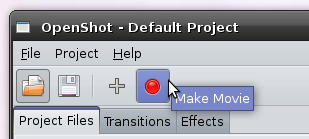
Also, just as significant as audio mixing, we've added the capability to render (i.e. export, make movie, etc...) your video project to an MPEG file. Of course, we will add more options and more formats in the future, but it's the first time OpenShot can actually produce anything meaningful, and thus... it's great news.

Screenshot of the new Make Movie button

What's next? There is still much to do before we have an official release. Here are a few features that I plan on addressing next:
  • A few more timeline related tools
  • A Make Movie dialog, with many more options and formats
  • Video Transitions
  • Video Effects / Filters
  • A Key-framing animation dialog / screen
As you can see, there is still plenty of work to be done. So, once again, if you are a Python developer and are interested in helping out, please drop me an email or join the "OpenShot Developers" team on LaunchPad.

3 comments

  1. ihmehyypioe  

    Would it be possible to do something like:

    If there is an audio file on a certain track:
    -> mute all other tracks

    That's a feature I've been searching for and no video editor I've tested has not that feature.

    It could be a track specific setting.

  2. Jonathan Thomas  

    I am planning on adding track specific settings, such as

    1) lock the track
    2) mute the audio
    3) hide the video

    So, you are suggesting a track specific setting that let's you "mute all other tracks when this track has audio"?

    Or a more generic setting, to quickly mute "all other" tracks... like a shortcut.

    Can you give me a real-world example of how you would use that in a video project?

    Thanks,
    -Jonathan

  3. ihmehyypiö  

    "Mute all other tracks when this track has audio" sounds correct.

    Let's say that you have a video with speech and at one point you want to change a few words with another sound without cutting the video. You place the sound file to a place and while it plays the video has no sound.

    I hope that made more sense. I'm not very good at explaining things...

    And if there was another setting that overrides it, for example if you want to add background music etc.

Post a Comment

Subscribe to: Post Comments (Atom)