
"I have a simple mission: To create an open-source, non-linear video editor for Linux. Many have tried and fallen before me, but for some reason I feel compelled to try myself. I am documenting my journey in this blog for all to read. It will be a dangerous journey, and I might not make it back alive. Hold on tight, and enjoy the ride! By the way, I'm calling this project OpenShot Video Editor!"

A new version of the OpenShot Build Wizard is now available that supports AVCHD, H.264, AAC, and MTS. Download the newest version of the build wizard, 1.0.3, and use FFmpeg option 3 (on the step that has three options).

This will download the newest FFmpeg and x264 libraries, and will make the following codecs available to you in OpenShot: libx264 & libfaac. You can use the mp4 and mov video formats with these codecs. In fact, there are other formats that also support H.264... but I'm not sure which ones.

Even though the Totem media player can't play H.264 encoded videos very well, you will be able to edit them just fine in OpenShot. In fact, if you want to enjoy smooth, clear playback of H.264 content, use the VLC player. It works great for me.

I just recently purchased a new Canon Vixia HF S100, which records it's videos in AVCHD format (i.e. MTS files). The demo video I uploaded to the "Videos" section was filmed with it. Man I love this camera!
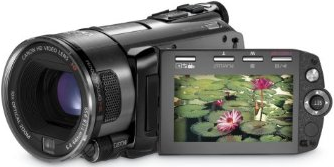


NOTE: You will need to have lots of CPU to edit HD videos that are encoded with H.264.

Legal disclaimer: OpenShot Video Editor does not contain or use any proprietary codecs. We support free and open-source codecs, such as Ogg Vorbis and Theora. However, since we use the FFmpeg library, it is possible to use any FFmpeg supported codec, assuming you have legal permission to do so.

21 comments

  1. 66666er  

    how can i remove openshot?

  2. Jonathan Thomas  

    Sorry, but there is no easy way to remove OpenShot, since the build wizard installs many different "dev" packages, which each install other dependencies, etc...

    Here is what I would do:

    1) Delete the following folders:
    ~/openshot
    ~/frei0r
    ~/x264 (if any)
    ~/ffmpeg (if any)
    ~/mlt

    2) Use synaptic to re-install the FFmpeg in the Ubuntu repository

    3) Any other programs that were installed can be removed via Synaptic, such as VNC, Kino, etc...

    4) To clean up the OpenShot icons, just delete them from your "main menu" in Ubuntu (available in the "System / Preferences")

    This should get you back really close to the state before you ran the build wizard. Eventually, we will be packaging up OpenShot as a .deb package and a PPA, and it will be much easier to install and uninstall.

  3. tjh  

    I keep telling it: Thanks!

    For information about container formats and which video formats are supported, see wikipedia.
    http://en.wikipedia.org/wiki/Comparison_of_container_formats

  4. Jeenu V  

    Looks like lots of activity is going on with this project? Please, why don't you make a deb for Ubuntu releases? At least it's very easy and less scary for users to try it out. That clean up question above would be easy to answer!

  5. MJ Peg  

    Hi there, many thanks for taking on this very worthwhile project and documenting your progress in such an open communicative way. I'm very excited at the prospect of such a well designed open video editor.

    The only problem is, I grew up with DOS and Windows, and have built in resistance to the scary newness of Linux despite thinking that it's a fabulous idea in principle.

    Is there any plan to provide a version that can take the Windows world by storm? Failing that, what about a Live USB Key version we can boot from?

    Thanks

  6. tjh  

    Let me try to answer some questions (on behalf of Jonathan).

    Jeenu: Eventually this will get packaged to .deb, but it seems that it's not yet time for that. However, anyone familiar with packaging can do it already. :) Jonathan has to prioritize tasks.

    MJPEG: Windows port is not likely. MLT framework, on which OpenShot builds, is for Linux and Mac OS X. Live USB Ubuntu should be able to run OpenShot.

  7. Cenwen  

    Hi Jonathan. When you done another version of the wizard, change the number.

  8. Helen McCall  

    Hello Cenwen and Jonathan,

    I am confused now.

    I downloaded openshot_wizard_1.0.3.tar.gz
    several days ago, which installed version 0.8.2 of OpenShot - which is what I've been using.

    Is there now a newer version of either the wizard or OpenShot which I should now upgrade to?

    Helen

  9. anders  

    Hey,

    it's great to read you've made so much progress since the last time I read your blog. And great that having read all the new posts yesterday, today there is already another new one :).

    I think the way you document your progress is really a good and helpful one, both for us nondevs and especially for you devs as an opportunity to appreciate and celebrate how far you've come already and as a big motivation to continue :) :) :).

    It was great to realize yesterday that there actually is already an good Wikipedia article for OpenShot. Amazing :) :) :).


    Just an issue I noted yesterday, If one has any of the unstripped ffmpeg packages installed, namely any of those:
    libavcodec-unstripped-52 - ffmpeg codec library
    libavdevice-unstripped-52 - ffmpeg device handling library
    libavfilter-unstripped-0 - ffmpeg video filtering library
    libavformat-unstripped-52 - ffmpeg file format library
    libavutil-unstripped-49 - ffmpeg utility library
    libpostproc-unstripped-51 - ffmpeg video postprocessing library
    libswscale-unstripped-0 - ffmpeg video scaling library
    instead of the respective stripped ones (without the "-unstripped" in their names), the installatzion of OpenShot with the build wizard will fail at least in Jaunty as it won't be able to install the various -dev packages for some of the above libs (libavcodec-dev libavdevice-dev libavformat-dev libavutil-dev libswscale-dev) because someone f###ed up their dependencies. So just install the stripped versions of the respective packages instead of the unstripped ones and it will work.
    Or choose ffmpeg install variant #3, this won't need the ubuntu dev-packages and would deinstall them again anyway as it freshly builds ffmpeg and all related libs.


    And I've got a question, Jonathan: Will I be able to replace the various UI icons with others of my choice (e.g. Tango ones and others where Tango ones are still missing)? Because, honestly, the UI icons are the one thing that I don't like about OpenShot atm. They look more like KDE than like Gnome imho :P ;).
    It would be cool if the icons were in some systemwide folder or there was a config file where they are all referenced, either way, just an relatively easy way to replace them with others if one wanted to.

    And I've got another: Will you, in the long term, support VDPAU (Its already on MLT's to do list in the Wiki)? Cause for playing H.264 HD vids with mplayer it already works great here and really takes the video processing load from the CPU. Dunno of how much use it can be for video editing though ... But even using CUDA could really help where VDPAU can't, now that I'm thinking 'bout it ...

    And a third :D: You said translation will begin later. I dunno, but last time I used Launchpad it SUCKED for translation, it really sucked so much that I stopped doing translations for Ubuntu ... I haven't used it for quite some time, but please consider using something else (like a GNOME app for writing the .po files easily at home) if it still sucks as much as it did a year ago or so. I would really like to do the German translation and I would rather do it with a helpful translation app :).

    And the final one :D: Why on earth do I have to install Kino to install OpenShot? Dont get it :D ...


    Finally, Jonathan, again thousand thanks for doing what will really move Linux forward a huge step, developing a good simple video editor for the Youtube/Vimeo Age :). In a way like Windows Moviemaker, only much better :) :) :).

    Wish you all the best and all the support you need :).

  10. Jonathan Thomas  

    Anders, thanks for the comment! I will look into fixing the build wizard to work with the unstripped FFmpeg libraries. I didn't realize that would break. By the way, some of the "dev" packages required to install MLT, have dependencies for other apps, like VLC and Kino. That's why they show up after running the build wizard. This won't happen once I'm able to package up OpenShot.

    The icons are themeable, and should be fairly easy to change. I opted for custom icons because Tango didn't have half the icons I needed. I didn't want to have a standard "play" button, and then a round "seek next marker" button, etc...

    As far as VDPAU goes, if MLT supports it, OpenShot supports it. So this would depend on MLT.

    I have setup the infrastructure to support translations in OpenShot with PO files, etc... I have used POEdit for my testing. However, I have never used LaunchPad for translations. I use LaunchPad for everything else, so I just assumed it would work good. If LaunchPad does suck at translations, I won't hesitate to fall back to just editing PO files.

    Thanks again for the feedback!

  11. wellwisher  

    A friendly suggestion to make things easier for newbies (without making it any harder for anyone else!)...

    Your download page includes the following instructions :
    Step 1) Extract to a folder named ~/openshot_wizard/
    Step 3) $ cd ~/openshot_wizard/

    Would you please consider adding to those instructions a simple explanation of what ~ means in a file path because that's totally alien to Windows users and Linux learners! I had to search for a helpful page to figure out what was going on.

    After downloading the zip/tar-thingy I didn't know where in the folders tree to extract the files to, as there was no mention of a ~ and I didn't yet know what it meant!

    A simple line as follows would have saved a lot of headscratching! :
    ( ~/openshot_wizard/ is Linux shorthand for /home/yourusername/openshot_wizard/ where "yourusername" is your login name )

    I hope that would make things even easier for people.

    Many thanks

  12. Jonathan Thomas  

    wellwisher, your wish has been granted! The download page has been updated with your text to better explain the "~" folder. Good suggestion!

  13. keen  

    How would you say OpenShot compares to Kdenlive, out of interest?
    More or fewer features?
    More or less stable?
    Better or worse support?
    Better or worse future prospects?

    Tough questions perhaps, but I'm intrigued to see if you're prepared to answer.

    Thanks

  14. Cenwen  

    helen
    If your installation is working great with the support of AVCHD, for me , that's no. not for the moment;What do you want to win more ? Try it more and more why not can you post it a video perhaps in the good section !!!
    For 2mandvd; check the dependences, i'm thinking that it's no automaticfor one.

  15. Helen McCall  

    Hello Keen,

    I'm prepared to answer your questions.

    I have transferred from using kdenlive, to using OpenShot because I have a very nice Panasonic HDC-SD100 AVCHD camera. OpenShot can edit my clips and produce very high quality HDV videos. This something I couldn't do in kdenlive.

    The best kdenlive can do is to take clips I've converted to standard definition DV or MPEG2 and produce very good quality DV output for standard definition DVDs.

    kdenlive is a very good editor, and at an advanced stage of development.

    OpenShot is still in Beta stage of development, and so at present has less features than kdenive. Many of the important features which OpenShot already has are very much more sophisticated and flexible than the equivalent in kdenlive. Notable examples being the integration of Inkscape for developing title sequences, and also allowing the use of Inkscape for developing sophisticated custom transitions.

    I am unable to comment on kdenlive support. However I can say the Jonathan has actively sought feedback from users, and worked very hard to meet their stated requirements.

    As far as stability is concerned, OpenShot has only been fully tested on three versions of Ubuntu so far, because it is still at Beta stage. kdenlive has been around for much longer so has been tested on many more platforms.

    For the platform I am using, Ubuntu 9.04 (Jaunty), I have found OpenShot to be as stable as kdenlive. Both appear to me to be equally capable of being crashed if you get things a bit too wrong! However I've found crashes did not occur after I had learnt proper usage of each package.

    This brings me back to support in OpenShot. My part in the team is to develop a manual and help system. With a well written manual and help system, it will be much easier to learn to use OpenShot effectively.

    I believe the prospects are looking very good for both kdenlive and OpenShot.

    For me the choice rests on the fact that OpenShot's enormous flexibility, gives me much more artistic freedom for creative expression. And to me, that is what counts at the end of the day.

    Helen

  16. Keen  

    Many thanks Helen for your informative post. I'm keeping a keen eye on how this develops, as I believe that the Windows world is sadly lacking decent free video editing and I think that a simple to use "Live USB Stick" with something like Linux Mint + OpenShot would be well within the abilities of those of us who aren't quite ready to abandon our Windows safety blankets yet :)

    It makes no difference to many of us whether we get a conventional free editor application or if we have to reboot into a friendly Linux that 'just works' to do a spot of editing and then reboot again afterwards. And when people see how many other goodies are in there too, and Firefox is there as well, they may increasingly find they no longer need Windows so much!

    Heck, when a resistant-to-change die-hard Windows user like me entertains the thought of investigating Linux at last, it really looks like there's a potential sea-change movement about to take place.

  17. Helen McCall  

    Hello again Keen,

    I wouldn't recommend Mint for video editing because you would be too restricted with regard to resources.

    The big "sea change" has been moving for the last few years. An ever increasing number of "die-hard" windows users are converting to Linux, especially Ubuntu.

    If you are resluctant to tamper with your Windows installation, just get a second internal hard drive, as big as you can afford (and they come quite cheap in the 320Gig sizes these days). Then download the installation cd from Ubuntu. If you have a modern 64bit machine, I recommend getting the 64bit Ubuntu. Install onto the second hard drive and Ubuntu will safely set your computer to dual-boot both Windows and Ubuntu.

    You will then have a choice from an amazing array of software for working on video with. Here is a list of software I can recommend for working on video:

    OpenShot HD/AVCHD/DV editor
    Kino simple editor
    Kdenlive advanced DV editor

    Inkscape vector graphics
    Gimp better than Photoshop!
    Synfig Studio professional animation

    Jokosher sound editor/mixer
    Audacity sound editor/mixer
    NoteEdit music composer
    Lilypond composer/score writer

    Subtitle Editor subtitles
    Smile slideshows
    DeVeDe DVD creator simple
    ManDVD DVD creator advanced

    vlc advanced viewer
    griffith video catalogues

    All of these I use successfully.

    There are many more high quality packages which I've not used. Everything from Blender (like RenderMan) to PovRay (advanced professional ray-tracing).

    Helen

  18. Keen  

    Thanks again Helen

    If I were to follow these pendrivelinux.com instructions to create a Live USB stick persistent version of Ubuntu, would I be likely to be able to run OpenShot successfully?

  19. Jonathan Thomas  

    Keen, I'm not sure if OpenShot will work on a Live CD or Live USB version of Ubuntu since I haven't tried yet, but you have a much better chance of it working than using Mint. All of my testing has been done with Ubuntu. I will give it a try on the Live CD though... you got me curious.

  20. Cenwen  

    @Helen tried EKD to place synfig and you can use fotowall with smile and the work of smile in 2mandvd. To do covers with discwrapper and gtklabelgen.Audacity for the audio (least hard than jokoser) and gcstart for collection.
    @jonathan.i send you a big mail, i'was thinking find the problem of the crash and i m' reading your link.

  21. Jonathan Thomas  

    I was able to successfully install OpenShot on a Live CD version of Ubuntu 9.04. So, I suppose it should work on the Live USB version also. Thanks!

Post a Comment

Subscribe to: Post Comments (Atom)