
"I have a simple mission: To create an open-source, non-linear video editor for Linux. Many have tried and fallen before me, but for some reason I feel compelled to try myself. I am documenting my journey in this blog for all to read. It will be a dangerous journey, and I might not make it back alive. Hold on tight, and enjoy the ride! By the way, I'm calling this project OpenShot Video Editor!"

Over the past 20 days we have been hard at work on many new features and enhancements. One of the unique things about OpenShot has always been our close interaction with our community (that's you). We listen to your feedback, and fix what you don't like. In that spirit, I have brought with me many fixes that should bring a smile to your face.

In no particular order, here are the new features in version 0.9.54 (our newest version in the PPA and DEB installers):
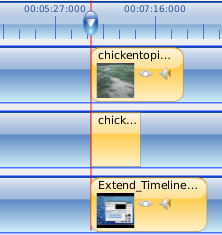
Snap to Play-Head!

Our snapping tool has been improved to also snap to the play-head. The play-head is the red line that designates what part of the video you are previewing.

Once you get the play-head into the perfect position, simply drag a clip close to the red line, and it will snap. Now you can line up clips across different tracks with awesome precision!


Auto-Extending Timeline!
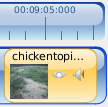
Have you ever had a video clip bigger than 10 minutes, and been annoyed that OpenShot does not auto-extend the timeline to fit the clip? Now you can drag or resize any clip past the end of the timeline, and it will simply extend the timeline... as it should!
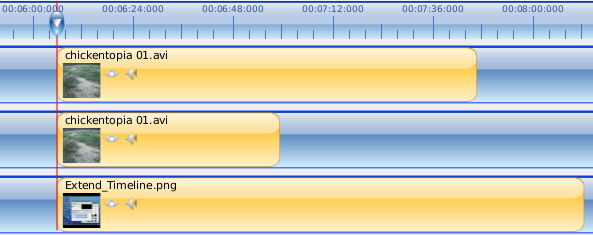

Improved Zoom!

Zooming now adjusts your scrollbars to keep your clips in view. Also, you can now use CTRL + Scroll Wheel to zoom into the timeline.


End of Ruler Fixed!

We have fixed the end of the ruler to have tick marks. Before this fix, the ruler always had a bald spot at the end. Not that big of a deal, but annoying.
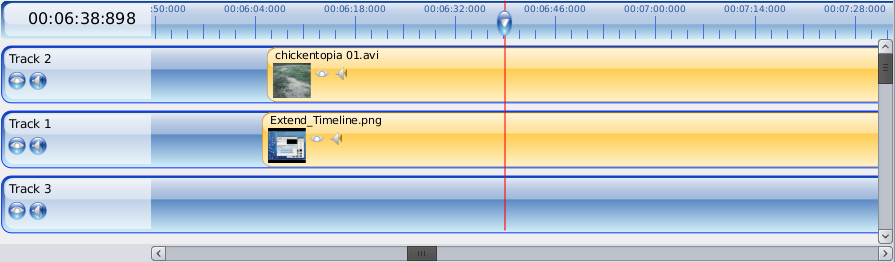

Play-Head Tracking!

When previewing your project, the scrollbars will now keep the play-head centered and always in view during playback. Think auto-scrolling timeline.
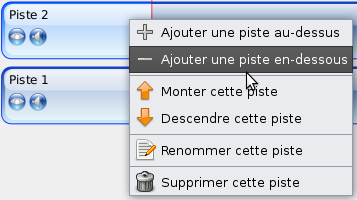

Translations Updated!

All 7 of our default language translations have been updated to the newest text from LaunchPad.

Any of our 40+ languages can be used. Just drop the .mo file in the /openshot/locale/ folder.


OMG! Ubuntu! Articles:

If you haven't already seen these articles, please take a look.

A Quick Chat With OpenShot Creator Jonathan Thomas

PiTiVi On Course To Become A Default Application In Lucid



Thanks to Andy, there is a new OpenShot Users website now! And guess what... it's got forums, tips on how to create your own transitions, alpha masks, and themes, and even how to add new effects. Check it out!


So... what's next you ask? Over the next few weeks I will be focusing on completing our help file, fixing a few remaining UI issues and paper cuts, and polishing up the new version 1.0 sticker. =) Stay tuned...

13 comments

  1. Boke Yuzgen  

    This app has a nice GUI for video editing newbies, not that I am one. My dad can edit his videos from now on. He's 62 years old. I read the progress. You guys doing great. Keep up the good work!

    Tested on a Virtualbox Ubuntu Karmic 9.10 installation. Used "sample_iTunes.mov" from http://support.apple.com/kb/HT1425. Preview window is blank. I added two instances of the sample to the timeline, added dissolve and charcoal. Exported movie is fine. Plays fine in VBox Ubuntu. So in short, there is a problem with the preview window, at least on VBox. I'm going to test on a real installation when I get back home.

    I started to translate OpenShot to Turkish at LaunchPad.

    Tell me if you need something from a graphic designer. Do you guys have a SF project that I can participate? I'll check it out.

  2. Anonymous  

    This is really going :)

    Will try the PPA!

  3. Trevor  

    Jonathan,

    You've mastered rapid development and community building, so no doubt with your positive attitude you'll master marketing, even if has to be guerrilla marketing.

    To that end, have you a version of the great Openshot logo with the tag line "Edited in Openshot" that users can embed in their closing credits? Or use on their website page (perhaps with click-through to your site).

    I'm sure Openshot will be making its way into Ubuntu and/or other distributions before too long.

  4. maxmaster  

    Awesome! The comunity can feel the feedback working.
    Canonical Should collaborate and put this one as a default editor.
    Pitivi It's just too slow in his development!

  5. Nicolás Alvarado  

    Good to know some news!!... i suscribe to the rss, and i check it every day, good progress i gonna try with the deb.

    Cheers.

  6. Paulo Morais  

    Hello Jonathan,

    Congratulations for the upgrades. I'm downloading the new version right now. Just a suggestion: you should develop a way to undock the video panel from the window. So we could use to monitors to edit videos with a professional style.

    []s
    Paulo

  7. Anonymous  

    An Undo button would be great :)

  8. Urkki  

    Undo and redo are absolutely needed, then this stuff is near the winner-class

  9. Miguel  

    Hey, guys, this is looking really great. I hope you don't forget us Windows users. =)

  10. Anonymous  

    (current entry - other one is on the In The Beginning info page)

    See this openshotusers.com topic
    "Blog Guide, development step by step" for a list of blog entries, with highlighted pointers to the most useful guides to OpenShot features.

  11. Lauchazombie  

    You are really doing a great job, i used openmovieeditor, cinelerra, pitivi, diva , kdenlive, avidemux, lives and by far you have the best app in such a record time

  12. nes  

    this program is great!

    congratulations for the upgrades...

    and i'm leaving an other vote to "undo & redo" functions!

    8)

  13. Anonymous  

    Undo:
    Put all your program variables into a single record structure, then have an array of those so that you can move the entire 'state' backwards and forwards.
    Every action sets a description string, so that "Undo clip resize", "Redo move clip" can appear on the menu, etc.

    Pretty sure you know about that technique already though!

    Good luck

Post a Comment

Subscribe to: Post Comments (Atom)