Latest News

Follow the latest news on OpenShot Video Editor!


,

The 3rd new feature in our 4 for 4 special is the Export Video dialog!!! This is no ordinary video export screen, but rather a complete set of video, audio, and image encoding features!
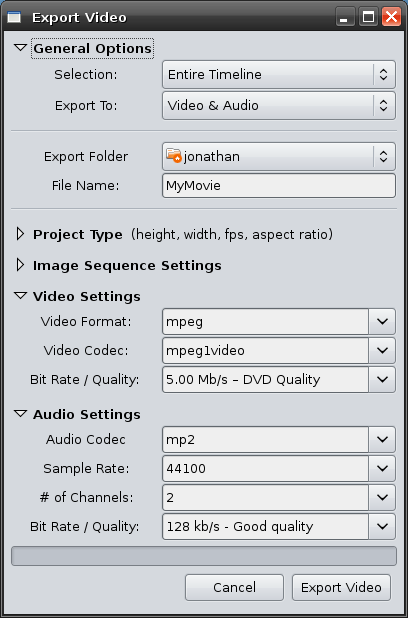

[screenshot of export dialog - default view]

In no particular order, here are the details:
  • Export options: "Video & Audio" or "Image Sequence"
  • All options can be picked from the drop-downs, but can also be easily changed by simply typing (for the expert user)
  • Progress-bar displays the export / render progress
  • All of the key FFmpeg video and audio options are present
Project Type Settings:
  • Width
  • Height
  • Aspect Ratio
  • Frame Rate (fps)
  • Pixel Ratio
  • Progressive or Interlaced
Image Sequence Settings:
  • Image Format
Video Settings:
  • Video Format
  • Video Codec
  • Video Bit Rate
Audio Settings:
  • Audio Codec
  • Sample Rate
  • # of Channels
  • Audio Bit Rate
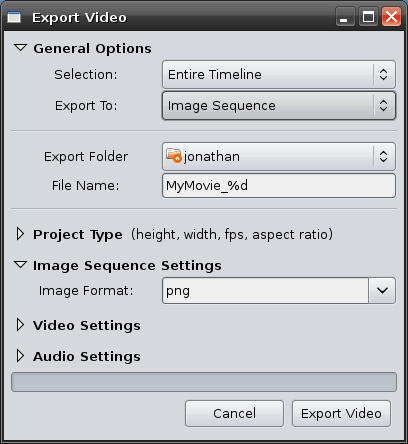
Here are some screenshots of the export video dialog with various options selected:

[screenshot with image sequence selected]
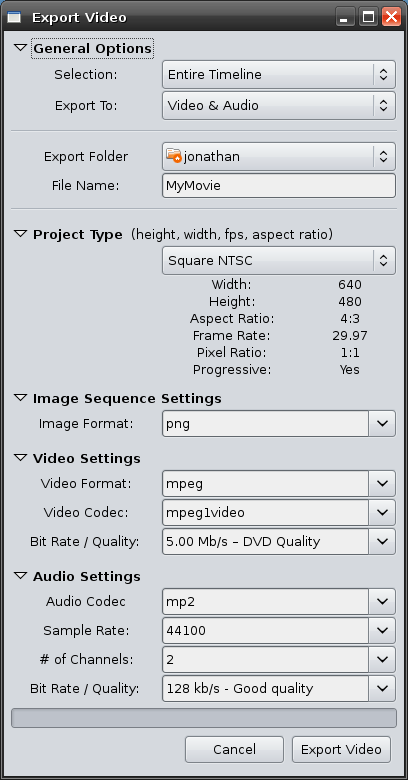

[screenshot with all options expanded]


This is a huge feature for OpenShot, and we hope you will enjoy trying it out. Stay tuned tomorrow night for our last feature in the OpenShot 4 for 4 special!

Legal disclaimer: OpenShot Video Editor does not contain or use any proprietary codecs. We support free and open-source codecs, such as Ogg Vorbis and Theora. However, since we use the FFmpeg library, it is possible to use any FFmpeg supported codec, assuming you have legal permission to do so.

Share to Facebook Share to Twitter Share to MySpace Stumble It Share to Reddit Share to Delicious More...

8 comments

  1. tin2tin  

    I love following you progress. A really friendly looking app.

    When do you think you'll reach a point with an actual release and we can start bang the drum and get noncoders in your direction?

  2. Jonathan Thomas  

    Great question. I don't have a go-live date for version 1, but there are only 2 more features which I will probably add before calling it version 1:

    1) Key-Framing
    * x
    * y
    * height
    * width
    * h-align
    * v-align
    * alpha
    * audio volume

    2) Filters
    * such as greyscale, frei0r effects, etc...

    Once I release version 1, we can start beating the drum. =)

    Thanks for the comment.

  3. wildhostile  

    Wow!
    That looks better and better. Keep doing the good work. Don't give up.
    Roland.

  4. pjman  

    This is looking really awesome!! Finally I am starting to believe we are going to have a viable video editor on Linux :)

  5. Jonathan Thomas  

    Thanks for the support! I really hope OpenShot becomes a popular video editor. I would love to have it come pre-installed with some distros. That would be great... but I still have a lot of hard work left before that will happen. =)

  6. Anonymous  

    For a time line based editor IMHO, the most essential filters are color correction & gamma so clips from different sources can be balanced so they're not obviously from different sources (camcorders).

    Very impressed by your progress so far!

    I was looking at gstreamer and find its API demented. I'd always thought C++ was the worst #include spaghetti until I tried to get their HelloWorld ogg player to compile. Ultimately its Ubuntu's fault for not have the sym links in /user/include for all the gst and glib versioned stuff, but I had to wade through the spaghetti to figure out what to link.

    Based on your blog I'm going to take a good hard look at MFT before I go any further with gstreamer!

  7. Jonathan Thomas  

    @Anonymous, thanks for considering the MLT framework. I'm still amazed at how good it is. =)

  8. Er.Animesh  

    hey.........nice work man!!!!i have faced a problem in MLT,i.e. to enable the audio of the base track while there is an overlay video track.So can you please help me out this problem? i am trying to learn MLT framework.........

Post a Comment

Subscribe to: Post Comments (Atom)