
,
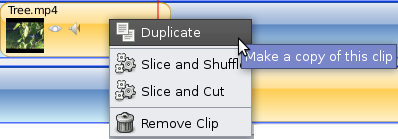
We have added a new menu item for clips (video, image, audio, and image sequence) called "Duplicate". It makes an identical clip on the timeline (every property is preserved, including IN and OUT settings).
Here is the new clip menu:
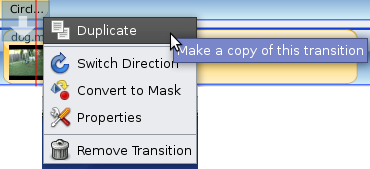
Transitions have also received the "Duplicate" menu item. It creates an identical transition (or mask), and retains all of the original settings.
Here is the new transition menu:
Also, based on a user suggestion, I have added a new key mapping:
TAB = toggles between the arrow and the trim / re-size tool.
When you combine these 2 features, it really feels good. You can quickly switch to trim mode, set the IN / OUT, and then duplicate the clip, and drag it somewhere else on the timeline. Very nice!


July 7, 2009 1:51 AM
I'm following this almost on daily basis... I almost installed yesterday, but I'm a bit afraid if this will mess up my Kino, 'cause this will delete previous video-libs etc. Any info about beta-release date or something? If this works the same as it looks, without crashes etc and renders succesfully, this will be my go to- tool on video stuff. I usually import video from my cameria via firewire to Kino, and then render it to avi. Really really waiting for this!!! Keep up the good work!
July 7, 2009 3:45 AM
Hello Urkki
My installation of Kino still works perfectly after installing OpenShot.
If you read my last comment on yesterday's posting, you will see that I re-installed the lost packages.
Use Synaptic to find which packages to re-install. In Synaptic there is an option to display grouped by "status". Select that option and then go to
"Not Installed (Residual Config)" where you will find the lost packages waiting for re-installation. Any settings you had on them will still be preserved.
Hope that helps!
Helen
July 7, 2009 7:27 AM
Thanks Jonathan for your hard work.
I'm not too familiar with actually using different video editing software - so it may have already been done somewhere, or it may be impractical, but here's some thoughts how I could imagine video editing "process" could go.
1. Import raw video material
2. Import audio/pictures etc.
3. Identify which sequences of video you'll be using (cut/trim clips you'll actually be using)
4. Decide in which order you'll show the clips
5. Add transitions where needed
6. Add titles, music, sound effects etc.
What I see in my mind is some kind of interface where I can cut/trim clips out of raw material, optionally give names to those clips, sort/order clips relative to each other. If I'd delete a clip, it would not create empty space on a timeline, but completely delete that part of the video.
Each clip would automatically have its own timeline, where titles, audio effect etc. could be added. And there could be "master timeline" for effects/titles/music that would last over clip "borders".
I'm not sure if I can express very well what I see. Or if it is worse or better than what most video editing software seem to do nowadays (I don't have much experience on those, though).
It's not so much "new interface" but a concept how clips should be handled. But it could also have alternative way of presenting "timeline".
I'd just select which clips I want to use and they'd automatically be put on a timeline one after another. If I'd make changes, like trim some clip further, I'd only touch that one clip. If I'd add another clip somewhere on a timeline, "slot" for that clip would be created and I wouldn't need to move other clips on timeline.
These are just my thoughts I wanted to share - kind of "mindstorming". :-) It may very well just be that I can't use current software effectively and that's why I imagine this kind of change in NLE "concept". Thanks.
July 7, 2009 3:52 PM
Hi!
I think you are going to create a great program!
I saw you're going to translate it (there are some "po" files in the "language" directory). I could make the italian translation, if you want.
July 7, 2009 4:37 PM
tjh, thanks for the suggestions. You bring up some good points about arranging and trimming clips... which creates gaps in the timeline. I have a few ideas on how to solve that... which I'll blog about soon. Thanks!
July 7, 2009 4:38 PM
Luca, we would love help translating, but we aren't quite ready yet. I'll make some announcements soon about translations. Thanks!
July 7, 2009 5:13 PM
I've just completed my first video project with OpenShot. The final cut was only 5 minutes long but it had an extensive number of files and transitions used; and I must say I was very impressed by the stability, usability and feel of the program.
I like the addition of the duplicate function, it will certainly speed things up for me when I use OpenShot for future projects. One request for another function: when right clicking on a clip would it be possible to have a function that controls the speed at which the clip plays, so that a clip could be slowed down or sped up? I've come across some video editors that (try to) achieve this by adding a filter onto the clip but it would seem far more intuitive to do this by controlling the properties of the clip itself. This function would be great for doing time lapse photography for longer film clips.
Thanks for all the work you've put into this program. I think it will soon be up there with the likes of Inkscape and Gimp.
July 7, 2009 5:43 PM
Hello Adam,
I like your idea for altering the speed of the clip.
This would be of great use to me in producing training videos for aerial
acrobatics, because I would be able to show movements in slow motion.
It would also give me much more artistic freedom in producing movies of our troupe's shows.
I had been thinking that a slow motion could be produced by inserting frames
in the clip, derived from something like a mexican hat or gaussian filter
with inputs from the frames either side.
However this idea would only produce a halving of speed. Any other speed change done this way would produce horrible artifacts caused by the sampling intervals.
Helen
July 7, 2009 11:47 PM
Thanks, Jonathan! I'm eager to read your future plans for "gapless timeline" or what-ever it is. It may have big impact on usability.
These "feature launch fests" are also very addictive. Good PR too.