
23
Oct
Video Rotation & More Export Options!
Written by on .
In our most recent update of OpenShot (version 0.9.52), we have added a shiny new effect, Rotate! The Rotate effect can apply either a fixed rotation or an animated rotation to all 3 axes, X, Y, and Z. As always, effects can be mixed together to create all sorts of exciting combinations!
Rotating pictures or videos can be a super useful effect, especially when so many hand-held phones (and cameras) can capture video. I record videos all the time with my phone, which are recorded side-ways, since that's the way I hold my phone. So a quick "Fixed Rotation" of 90 degrees does the trick!
On some occasions, animating a rotating image, video, or title can be a really nice effect. I have put together a demo video which showcases both the fixed rotation and animated rotation. This video is quite pointless, but hopefully it succeeds in showing the rotation features. =)
We have also improved our simple export settings to include a new mode, called "All Formats". This mode lists each video format / codec and let's you choose the exact format you want. It also presets the audio codecs, and only shows compatible format / codec combinations.
Your project's video profile is automatically selected, to match your project's profile, but it will allow you to export to any of our profiles. Three quality settings are listed for each format.
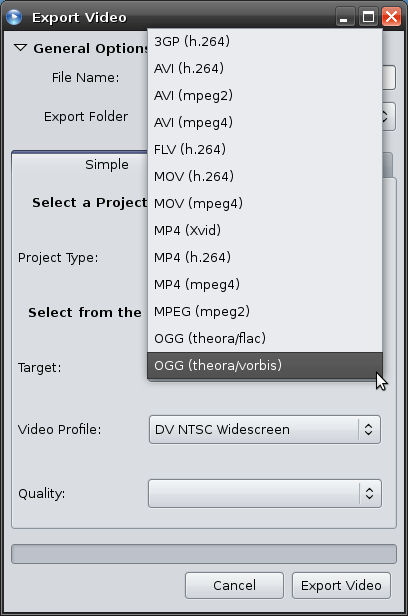
[Here is the new "All Formats" mode in our export screen]
We are rapidly approaching our official release (version 1.0.0). Before we can reach this point, we need some more translation help. We have added many new strings and have a few new screens. So, please jump in and help us out with our translations. If you've never tried to help with translations before, don't worry. It's not difficult at all. We use a website which let's you translate one phrase at a time. No command line skills necessary. =)
We hope you enjoy these new features, and please share your feedback with us after you have tried them out. Enjoy!
Rotating pictures or videos can be a super useful effect, especially when so many hand-held phones (and cameras) can capture video. I record videos all the time with my phone, which are recorded side-ways, since that's the way I hold my phone. So a quick "Fixed Rotation" of 90 degrees does the trick!
On some occasions, animating a rotating image, video, or title can be a really nice effect. I have put together a demo video which showcases both the fixed rotation and animated rotation. This video is quite pointless, but hopefully it succeeds in showing the rotation features. =)
We have also improved our simple export settings to include a new mode, called "All Formats". This mode lists each video format / codec and let's you choose the exact format you want. It also presets the audio codecs, and only shows compatible format / codec combinations.
Your project's video profile is automatically selected, to match your project's profile, but it will allow you to export to any of our profiles. Three quality settings are listed for each format.
[Here is the new "All Formats" mode in our export screen]
We are rapidly approaching our official release (version 1.0.0). Before we can reach this point, we need some more translation help. We have added many new strings and have a few new screens. So, please jump in and help us out with our translations. If you've never tried to help with translations before, don't worry. It's not difficult at all. We use a website which let's you translate one phrase at a time. No command line skills necessary. =)
We hope you enjoy these new features, and please share your feedback with us after you have tried them out. Enjoy!