
Latest News

Follow the latest news on OpenShot Video Editor!


,

As everyone knows, OpenShot has a new 3D animated title system. However, what you might not know, is exactly how Blender is being used to create these animations. I thought I would explain what goes into creating a new Blender title sequence.

But first, take a look at the newest Blender template I added today. It's quite pretty, and very flexible. As you watch this video, I want you to think about the following question. Can your favorite video editor do this?


When using OpenShot, the interface is super simple. Take a look at the window I used to create the titles for this video. Each animated curve has a color picker, so adjusting the colors is quick and easy. The glare and lighting in the video are affected by the different colors, so choose wisely, and create your own stunning combination.
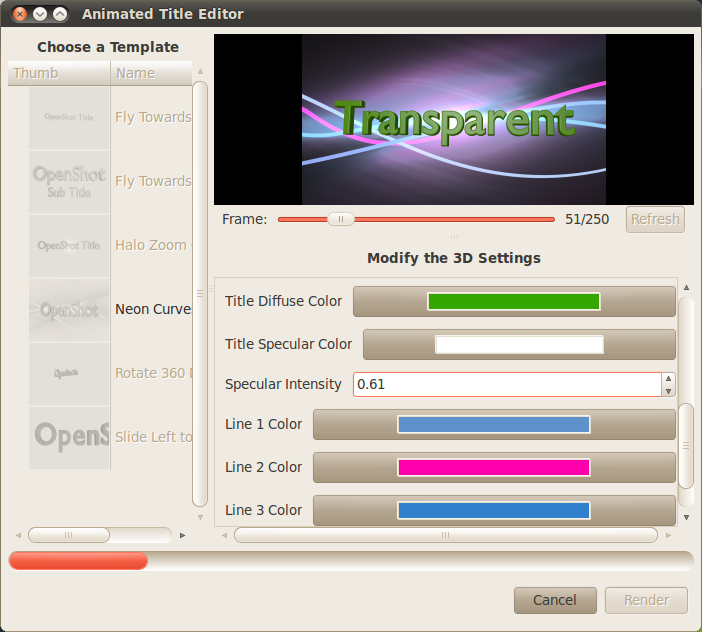
(Click image to enlarge)

So, the first step to creating this Blender template was to install Blender 2.5 (alpha). Once Blender is installed, I modeled a few curves and positioned them in a random fashion in front of the camera. I created a new material for each curve, so that the user can adjust the colors independently. The material also emits light and has no shadows, which helps create the illusion of a "neon" tube.
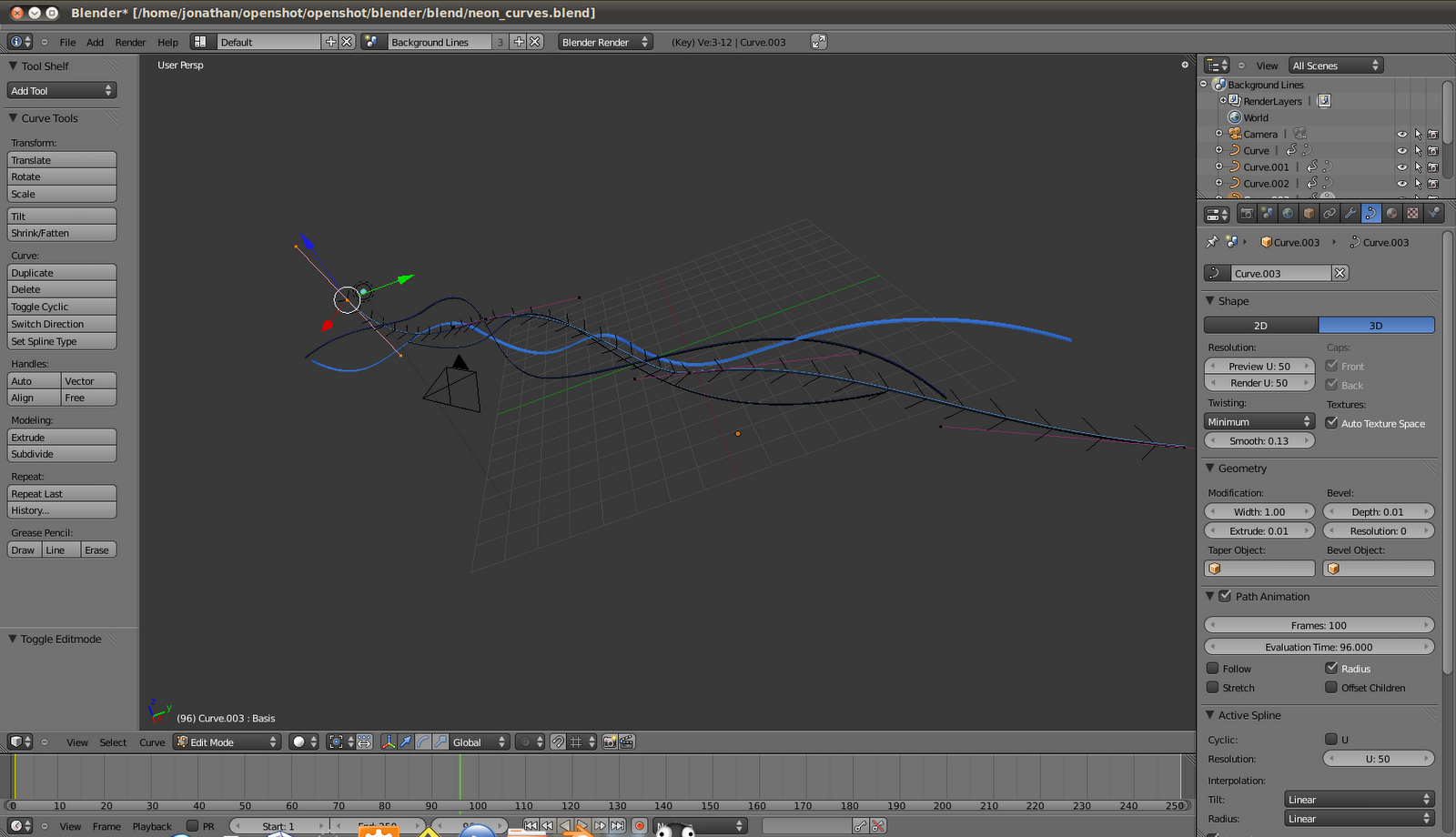
(Click image to enlarge)

Once the scene is modeled, I used the animation system in Blender to key frame a series of movements for the curves. For the most part, each curve is moved from the left to the right over 250 frames. Each key frame is visualized in the IPO curve window, so they can be manually adjusted until the animation feels just right.
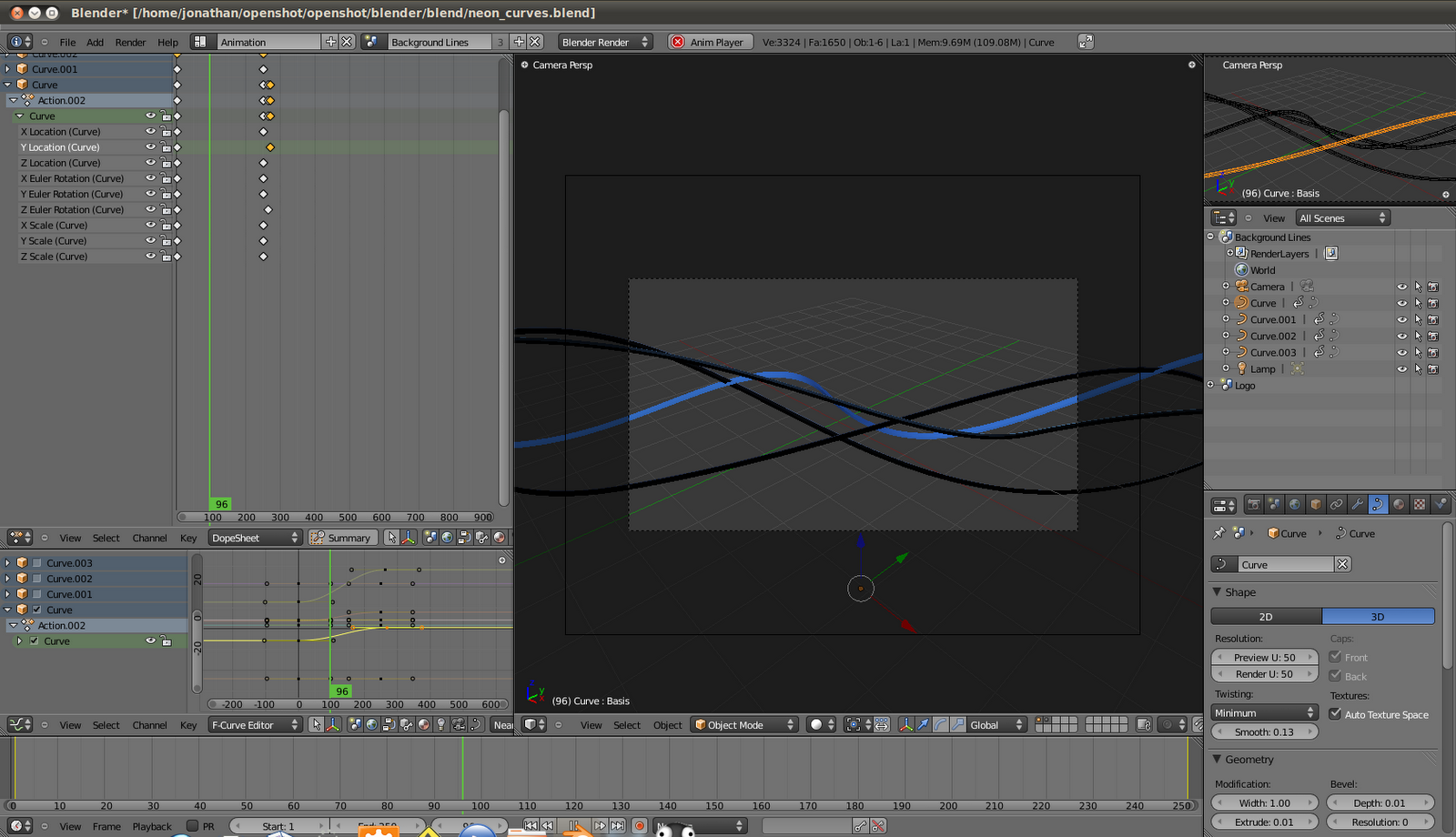
(Click image to enlarge)

Next, I used the composite node editor in Blender to route the output of each frame through a series of nodes. This part can be a bit tricky if you are not familiar with how a node based editing system works. The goal was to take the curves (which are emitting light), and create a glare, which will help sell the idea of "neon" lights. To complicate things, the actual "text" of the title needed to be isolated from this glare, so not to blur the text. So, the text is actually in a different scene, and is combined together in the composite nodes, with some clever routing of the alpha channel.
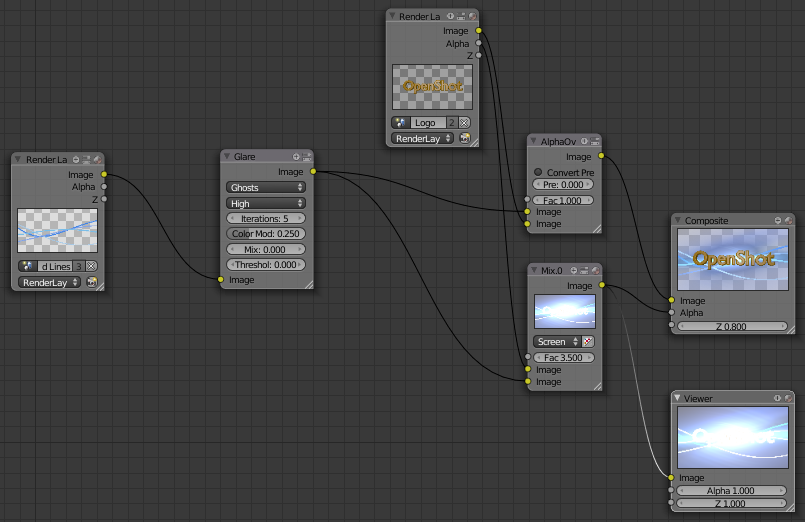
(Click image to enlarge)

The last step was to create an .XML file which explains what "parameters" are available for this template, so that OpenShot can display a simple interface for the user. Most of the templates have a very similar set of parameters, so a little bit of copy & paste, and this step was done. Also, a custom python script needed to be created, which applies the parameters to the actual Blender template. Again, a little copy & paste helped complete this step.

Now it's ready to test and see if it actually works inside OpenShot. One more fun fact... more than 1 title can be created at a time. So, if you have a few different titles that need to be created for a video, they can all be rendering at the same time.
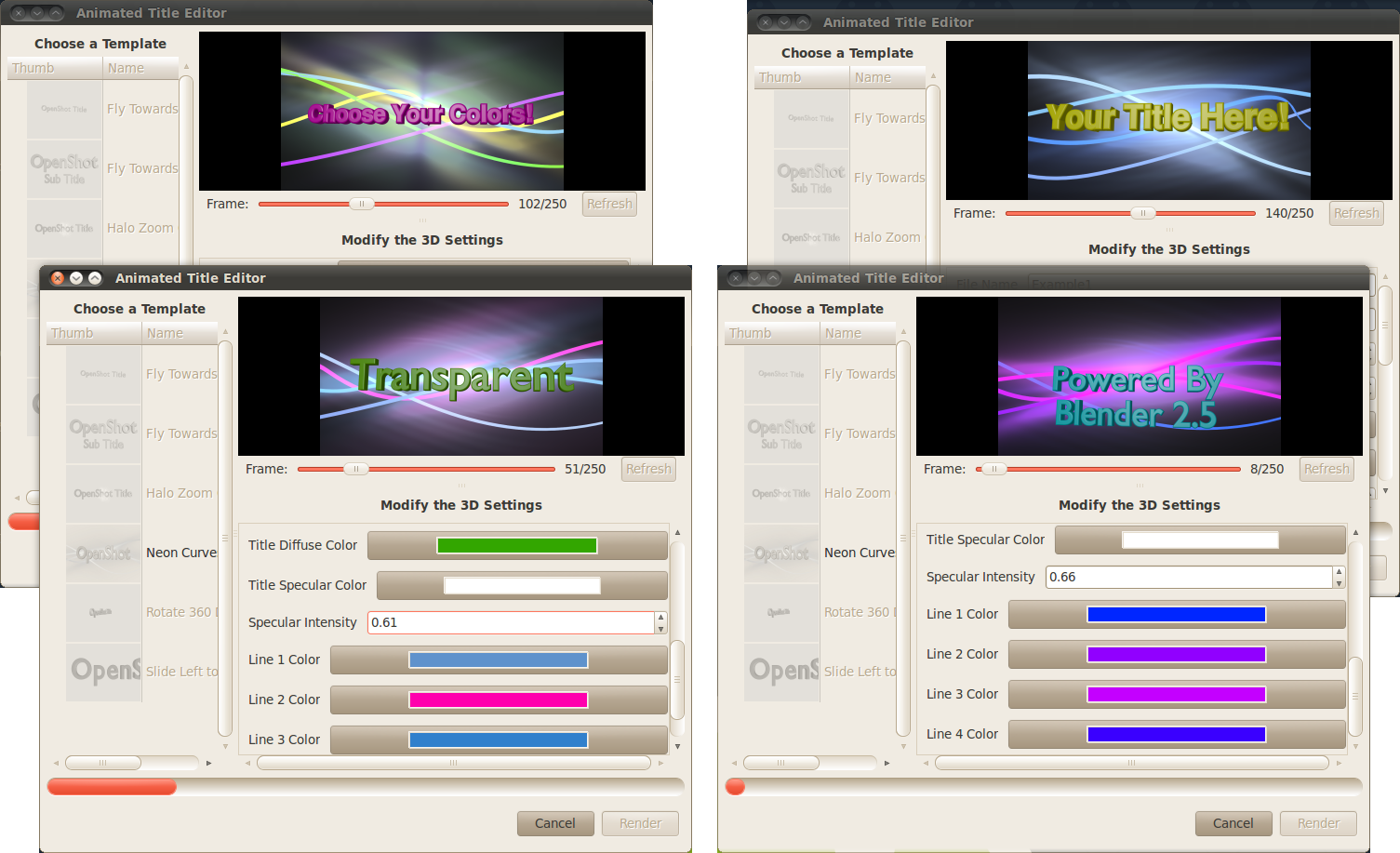
(Click image to enlarge)

Well, that about wraps up this post on how to create a Blender template for OpenShot. If you are serious about contributing title templates, please post them on our forums, and we'll select the coolest ones to include in OpenShot. Don't worry about the .XML and python scripts. Those are easy to create, and I can always assist.

Share to Facebook Share to Twitter Share to MySpace Stumble It Share to Reddit Share to Delicious More...

18 comments

  1. AnxiousNut  

    YES! my favorite video editor can do this!! OpenShot is the best!

    But seriously, you've done a great job, im pretty sure because of this a lot of people will start using it from now on!

  2. Alex  

    As you watch this video, I want you to think about the following question. Can your favorite video editor do this?

    As my favourite video editor is Blender, I'd have to say that the answer is "yes". I still love having something with the straightforward simplicity of OpenShot, though. So, cheers for all the good work.

  3. ANO1453  

    Can your favourite video editor do this?
    Apparently, it can!

  4. prunus-dulcis  

    This is so cool... will try it out later - just a quick question which came to my mind. Is it possible to use frame images of OpenShot as background image sequence in Blender for basic reflection / refraction calculations?

    In any case, this is a wonderful feature!

  5. Jonathan Thomas  

    @prunus-dulcis,
    Yes, it is possible, although I have not got that far yet. Eventually (i.e. not right now), I would like this feature to include transitions and all sorts of effects that would have access to the same source material as OpenShot. Thanks!

  6. Anonymous  

    Thanks Jonathan Thomas,

    just made some quick adaptations to one of the py files so they work with newer revisions of blender (the api is still not stable). Did not find the quality setting but the rest seems to work. Created a new forum entry for it!

    Now that I understand better how it works, looking forward to how you may implement blender getting the frames from openshot ;)

  7. Anonymous  

    Jonathan, using Blender is a great way to tap into it's power. Did the new 2.5 python api make it far easier for you?

    Untapped power as yet will be the input of a few skilled blender artists creating some stunning slick animations rather than the current chessy ones. jk

    Looks like your Blender skills are developing nicely too.

  8. Vid*  

    Video clips as textures.

    That's all I'm waiting for to start pumping out new Blender/OpenShot templates... ;D

    So close... so very close!

  9. gabriele vidali  

    i guess a very loved effect is the video coming out from a still frame which is inside a scene.
    i.e.: i have a man watching a picture, the picture zooms in and a video starts from that picture.
    any chance to have it ?
    it's like the http://2.bp.blogspot.com/_AuTEvUYi4Ms/SksAlA_INPI/AAAAAAAAAuo/29Bh6RrDtH0/s1600-h/Mask1.png but with a selectable area

  10. Anonymous  

    When I saw that 3D titles were implemented in OpenShot, my first thought was : "who would ever consider using such 3D titles for any serious (or semi-serious) video eidting ?"

    Now I actually realized that with the simple creation of templates, it actually adds quite a lots of power to OpenShot, simply because Blender is the best open source compositing app available.

    I see no use in having animated 3D rotating titles. But with Blender you can create such things as a complex animated "MTV song banner", and customize it easily with OpenShot. If it really works that well, that's what I call a powerfull feature !

    Great job !

  11. tjh  

    I'm with anonymous (#10) - I was a bit skeptical first. 3D titles could look cheap, but that's up to person editing/designing. This feature definitely has potential and when correctly used, can add professional touch to videos. I.e. "Subtle zoom" effects could be used for opening credits. Wonderful. OpenShot exceeds my expectations. Good job Jonathan and contributors.

  12. Impressed  

    Hi guys, long time no see, just checking back to see how OpenShot is getting along, and it's doing well I see! Well done.

    I can't easily run the latest version, so I'd be grateful for an answer please.....

    Is it limited to one subtitle per clip? I'd be delighted if there was a dedicated independent timeline track for titles, like there was on Windows Movie Maker back in XP, which made cutting&pasting titles a breeze..... long clips could have many subtitles of the same style as time progressed, really easily. I get dismayed with NLEs that only allow one title per clip, forcing you to cut up long sequences and go through longwinded annoyance per subtitle!

    Thanks, keep up the good work

  13. Jonathan Thomas  

    @Impressed,
    Both static and animated titles are treated by OpenShot as normal clips. There is no special treatment. In other words, you can have 100 titles on a clip, or just a single title. It's completely up the user.

    The titles just need to be placed on a track above the clip, so they are not covered up.

    Thanks!
    -Jonathan

  14. TheR Software  

    I cant find the animated title editor! you need detailed instructions!

  15. Jonathan Thomas  

    @TheR Software,
    This feature is not yet available. It will be included in our next release. Thanks!

    -Jonathan

  16. Brant  

    This looks extremely interesting actually. I use Blender regularly and am just adapting to the new interface. One question though, this creates a new external dependency in the application. How is this going to be handled? Will one need to point OpenShot at an appropriate blender2.5 binary or will it be included as some kind of builtin? Most distros do not have it in their repositories, at least not 2.5 :)

  17. Jonathan Thomas  

    @Brant,
    Thanks for the comment. There is a new preference in OpenShot for the Blender 2.5 path. So, this would likely require the user to go download Blender 2.5, and then update this preference in OpenShot.

    If you don't have it pointing at the newest Blender executable, a friendly error is shown with instructions on what to do.

  18. comeinandburn  

    Is there a way to choose the text type in Openshot for use with the Blender template? Maybe some kind of positioning function as well.

    I'm a blender user and these type of sequences are straight forward to set up and could give amazing results.

    I'm not sure exactly how your scripts work but if you were able to include standard links to materials, font type, nodes etc. then users could start making their own templates (maybe create a basic template to start for users)

    great idea!

Post a Comment

Subscribe to: Post Comments (Atom)